

Unreal Engine 5 supports many different ways to manage audio for a game.
In this short blog post I’ll explain the strategy I used for Bradamante in order to get global audio mixing that changes according to Play Mode.
Context: Play Modes?
Bradamante is an action/adventure game, and features several Play Modes, the Player Controller is responsible for changing between modes, which affect which inputs are read, and how several systems in the game behave.

- Exploration Play Mode would be the basic mode the player is in, most of the time. In here the player can move around and interact with objects and NPCs.
- Combat Play Mode is active when the player enters a combat area or when the events of a level trigger a fight. Players cannot attack outside of combat.
- In Dialogue Play Mode the player cannot move, any attack is halted, and the dialogue UI appears on screen.
I want to change the way the game sounds depending on the Play Mode. This includes a few basic features like:
- Different music during combat
- Focus on voice during dialogue (we hope to have VA for this game, only time will tell)
- Muffled sounds and music while using a menu
- Etc…
The strategy: Sound Classes
Unreal Engine is extremely deep, there are many ways to achieve what I wanted. I want a system that works on any level, with any music and sound effects with the least amount of code involved.
My solution was to use Sound Classes and Sound Class Mixers. I assign a Sound Class to each and every sound I import into the project.
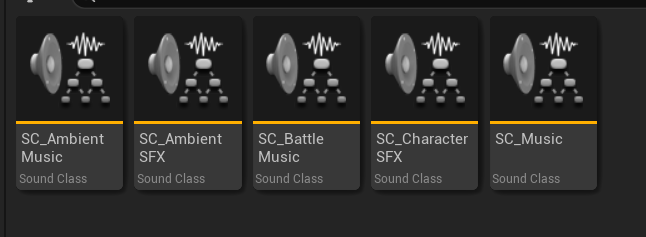
At the moment of writting this, I only have 5 Sound Classes, every sound in the game is set to one of these.
- Ambient Music is for music that’d sound in the Exploration Play Mode.
- Ambient SFX is for ambient sound effects.
- Battle Music is for music that’d sound during combat.
- Character SFX is for voices.
- Music is a parent class for both types of music.
The next step is to configure a Sound Class Mixer for each of my Play Modes. Every Sound Class Mixer has particular rules for each sound class.
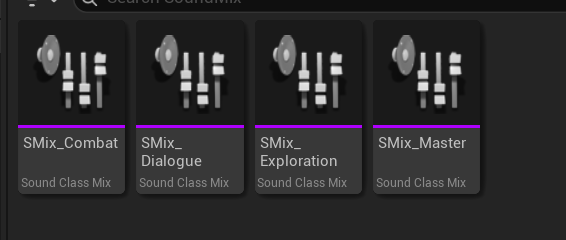
For instance, the Combat Mixer has 0 volume for Ambient Music and 1 volume for Battle Music

Now, when I switch Play Mode in the Player Controller, I also set the corresponding Sound Mixer. Some are missing at the moment, I’ll add them later.

This affects all sounds playing at any given moment. As long as their Sound Class is properly assigned. This strategy requires some care when adding and classifying sounds, but it saves me a lot of time later when I’m working on a level.
Speaking of which, for the music I only have to add two Ambient Sound actors in my level, each assigned to an audio clip that has the correct Sound Class.
